 Ryan Malloy
3891dd3566
Ryan Malloy
3891dd3566
num_ctx makes Ollama reload the model at a different context size (an
unload+load). Against a resident qwen3:32b at ctx 32768, our request asked for
8192 — forcing a 29GB reload on every call, which stalls indefinitely whenever
the backend's eviction path is unhealthy.

A/B against the gateway, identical requests otherwise:
  stream, no num_ctx    -> 200 in 0.31s
  stream, num_ctx=8192  -> http 000, hangs 60s+

It was also counterproductive: it shrank the context the model already served.
SpiceBook
A notebook interface for SPICE circuit simulation.
Write the narrative. Run the simulation. See the waveform. All in one document.
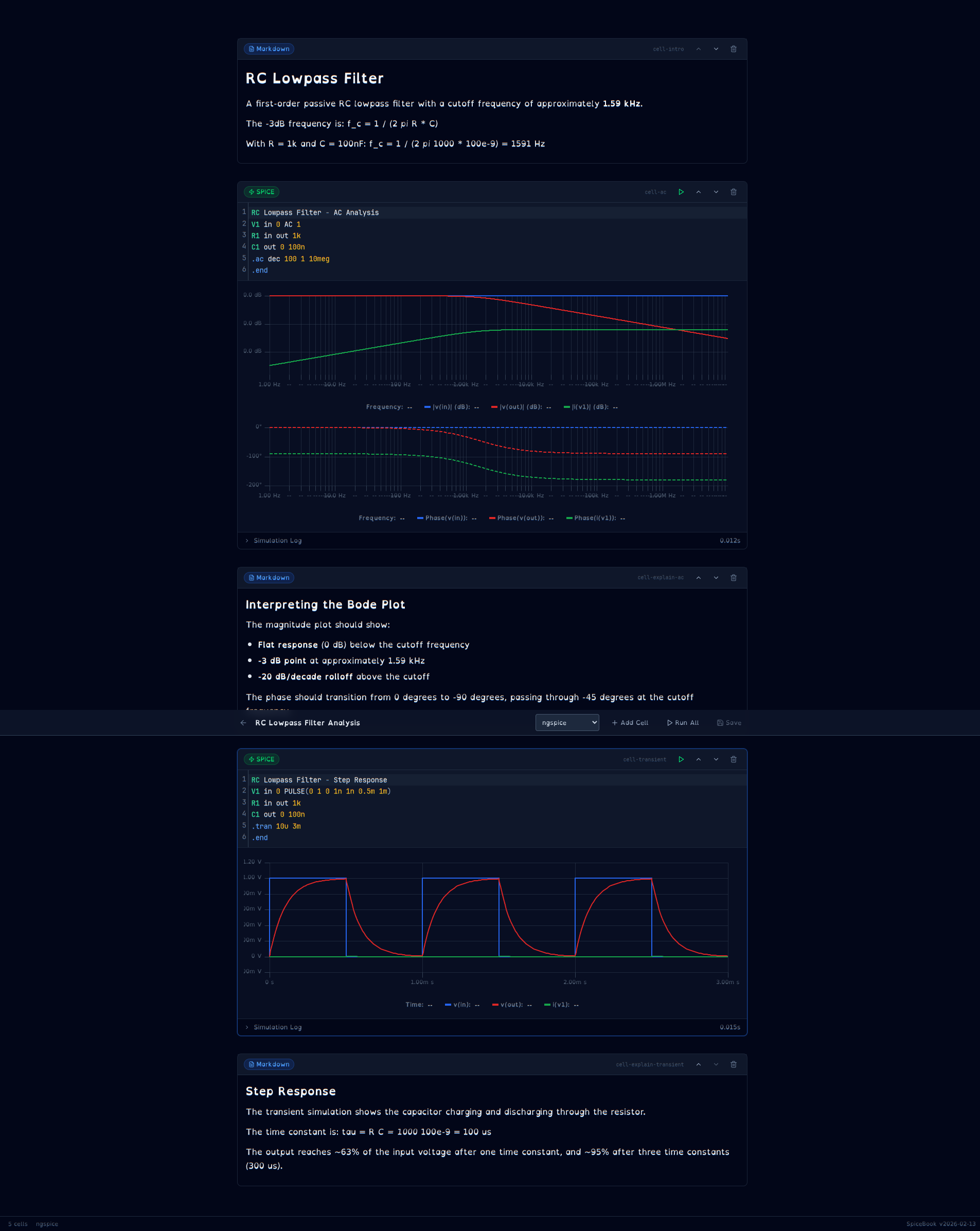
What is this?
SpiceBook is a notebook for circuit engineers. Markdown cells for explanation, SPICE cells for simulation, waveform plots for results -- interleaved in a single document you can re-run, share, and version control.
Think "Jupyter for circuits" except it actually understands SPICE. The editor highlights your .tran and .ac commands. The waveform viewer knows about dB and degrees. Engineering notation on the axes reads 1.59 kHz, not 1591.549.
Nothing else does this. PySpice needs you to write Python. CircuitLab is closed-source and schematic-only. Multisim Live is shutting down. The browser-based ngspice wrappers give you one netlist and one plot -- no narrative, no interleaving, no notebook.
SpiceBook lets you write a document that says: "here's why this filter works, here's the AC analysis proving it, here's the step response confirming the time constant" -- and every claim is backed by a live, re-runnable simulation.
Features
-
Markdown cells with rendered preview -- headings, bold, lists, inline math notation
-
SPICE cells with CodeMirror 6 and custom syntax highlighting:
- Dot commands (
.tran,.ac,.dc,.model,.param,.subckt, ...) - Component prefixes (
R,C,L,V,I,M,Q,D,X) - Engineering notation (
1k,10u,3.3meg,100p) - Comments (
*and;), brace expressions ({10k*(1-x)})
- Dot commands (
-
Waveform viewer built on uPlot (~50KB, fast):
- Multi-trace overlay with color-coded legend
- Stacked Bode plots (magnitude dB + phase degrees) for AC analysis
- Time-domain plots for transient analysis
- Log-scale frequency axis, engineering-notation labels
- Click-drag zoom, scroll to pan
-
ngspice backend -- subprocess execution with binary
.rawfile parsing -
Notebook operations -- create, open, edit, save, delete, reorder cells, run individually or all at once
-
Color-coded resistor schematics -- zigzag symbols colored with standard 4-band resistor color codes. A 10kΩ resistor renders Brown-Black-Orange-Gold directly on the schematic symbol, bridging the gap between physical components and abstract schematics. Falls back to standard monochrome for parametric or out-of-range values.
-
Keyboard shortcuts --
Ctrl+Ssave,Shift+Enterrun cell -
Clean URLs --
/notebook/rc-lowpass-filtervia Astro dynamic routes -
15 example notebooks included:
Fundamentals:
- RC Lowpass Filter Analysis (AC + transient)
- Voltage Divider (DC operating point + sweep)
- Common Emitter Amplifier (AC + transient with BJT model)
- RC Step Response, RLC Bandpass Filter, Diode Rectifier, LED I-V Curve, Inverting Op-Amp, CMOS Inverter
Advanced (multi-cell, real-world circuits):
- Synchronous Buck Converter -- 12V-to-3.3V switching regulator with startup and steady-state detail
- Class AB Push-Pull Audio Amplifier -- frequency response, clean output, and overdrive clipping
- AM Radio Receiver -- envelope detection with carrier and audio waveforms
- Dickson Charge Pump -- voltage multiplication under light and heavy loads
- Transmission Line Signal Integrity -- unterminated ringing vs series-terminated clean signals
- 4th-Order Sallen-Key Butterworth Filter -- active filter vs passive RC comparison
- Colpitts RF Oscillator -- ~1 MHz oscillation startup and steady-state
Quick Start
Prerequisites
- ngspice -- the simulation engine
- Arch:
sudo pacman -S ngspice - Debian/Ubuntu:
sudo apt install ngspice - macOS:
brew install ngspice
- Arch:
- Python 3.12+ with uv
- Node.js 20+
Local Development (no Docker)
# Clone
cd spicebook

# Backend
cd backend
uv sync
uv run uvicorn spicebook.main:app --host 0.0.0.0 --port 8099 --reload

# Frontend (separate terminal)
cd frontend
npm install
npx astro dev --host 0.0.0.0 --port 4322
Docker (Development)
make dev
Frontend at http://localhost:4321, backend at http://localhost:8099, API docs at http://localhost:8099/docs.
Docker (Production)
make prod
Production mode runs behind Caddy with TLS via caddy-docker-proxy. Set SPICEBOOK_DOMAIN in .env.
Makefile Targets
| Target | What it does |
|---|---|
make dev |
Build and start dev containers with hot-reload |
make prod |
Build and start production containers |
make down |
Stop all containers |
make logs |
Tail container logs |
make clean |
Remove containers, volumes, and build artifacts |
make backend-shell |
Shell into the backend container |
make help |
List all targets |
Project Structure
spicebook/
├── frontend/                # Astro 5 + React 19
│   ├── src/
│   │   ├── pages/           # Astro routes (index, /notebook/[id])
│   │   ├── components/
│   │   │   ├── notebook/    # Editor, cells, output viewers, toolbar
│   │   │   └── ui/          # Button, Badge, Dropdown (shadcn/ui)
│   │   ├── lib/
│   │   │   ├── spice-language.ts   # CodeMirror SPICE mode
│   │   │   ├── waveform-utils.ts   # Engineering notation formatter
│   │   │   ├── notebook-store.ts   # Zustand state
│   │   │   ├── api.ts              # Backend client
│   │   │   └── types.ts            # TypeScript types
│   │   └── styles/globals.css
│   └── astro.config.mjs
├── backend/                 # FastAPI + ngspice
│   ├── src/spicebook/
│   │   ├── main.py          # App factory, health check
│   │   ├── config.py        # Settings from environment
│   │   ├── engine/          # SPICE engine abstraction
│   │   │   ├── base.py      # Abstract base class
│   │   │   ├── ngspice.py   # ngspice subprocess + .raw parser
│   │   │   ├── schematic.py # Netlist → SVG schematic (SchemDraw)
│   │   │   └── resistor_colors.py  # Color-coded zigzag resistors
│   │   ├── models/          # Pydantic schemas
│   │   │   ├── notebook.py  # Notebook, Cell, CellOutput
│   │   │   └── simulation.py
│   │   ├── routers/         # API endpoints
│   │   │   ├── notebooks.py # CRUD
│   │   │   ├── simulation.py # Run cells
│   │   │   └── waveforms.py # Waveform data
│   │   └── storage/
│   │       └── filesystem.py # .spicebook file I/O
│   ├── tests/
│   └── pyproject.toml
├── notebooks/
│   ├── examples/            # Shipped example notebooks
│   └── user/                # User-created (gitignored)
├── docker-compose.yml       # Base services
├── docker-compose.dev.yml   # Dev overrides (hot-reload, port mapping)
├── docker-compose.prod.yml  # Prod overrides (Caddy, no ports exposed)
├── Makefile
└── .env
.spicebook File Format
Notebooks are JSON files with a .spicebook extension. Git-friendly, outputs persisted inline.
{
  "spicebook_version": "2026-02-13",
  "metadata": {
    "title": "RC Lowpass Filter Analysis",
    "engine": "ngspice",
    "tags": ["filter", "passive"]
  },
  "cells": [
    {
      "id": "cell-001",
      "type": "markdown",
      "source": "# My Circuit\nExplanation goes here.",
      "outputs": []
    },
    {
      "id": "cell-002",
      "type": "spice",
      "source": "V1 in 0 AC 1\nR1 in out 1k\nC1 out 0 100n\n.ac dec 100 1 10meg\n.end",
      "outputs": [
        {
          "output_type": "simulation_result",
          "data": { "success": true, "waveform": { "..." : "..." } },
          "timestamp": "2026-02-13T12:00:00Z"
        }
      ]
    }
  ]
}
Tech Stack
| Layer | Technology |
|---|---|
| Frontend framework | Astro 5 (SSR, Node adapter) |
| Interactive islands | React 19 |
| Code editor | CodeMirror 6 (custom SPICE language mode) |
| Waveform charts | uPlot |
| State management | Zustand |
| Styling | Tailwind CSS 4 |
| UI components | shadcn/ui |
| Icons | Lucide |
| Backend | FastAPI |
| SPICE engine | ngspice (subprocess) |
| Data validation | Pydantic |
| Containerization | Docker Compose |
| Reverse proxy | Caddy (via caddy-docker-proxy) |
API
The backend exposes a REST API. When running in dev mode, interactive docs are at http://localhost:8099/docs.
Key endpoints:
| Method | Path | Description |
|---|---|---|
GET |
/api/notebooks |
List all notebooks |
GET |
/api/notebooks/{id} |
Get a notebook |
POST |
/api/notebooks |
Create a notebook |
PUT |
/api/notebooks/{id} |
Update a notebook |
DELETE |
/api/notebooks/{id} |
Delete a notebook |
POST |
/api/notebooks/{id}/cells/{cell_id}/run |
Run a SPICE cell |
POST |
/api/simulate |
Run a standalone simulation |
GET |
/health |
Health check |
Configuration
All configuration is via environment variables (.env file). See .env for the full list.
| Variable | Default | Description |
|---|---|---|
ENVIRONMENT |
dev |
dev or prod |
BACKEND_PORT |
8099 |
Backend port (dev only) |
FRONTEND_PORT |
4321 |
Frontend port (dev only) |
NGSPICE_PATH |
/usr/bin/ngspice |
Path to ngspice binary |
NOTEBOOK_DIR |
/app/notebooks |
Notebook storage path |
SPICEBOOK_DOMAIN |
-- | Domain for production (Caddy TLS) |
VITE_HMR_HOST |
-- | Set when behind reverse proxy |
Roadmap
Phase 2 -- Core Features
- Python cells with sandboxed execution and cross-cell data access
- LTspice engine integration (via mcltspice library)
- Measurement cursors in waveform viewer
- SVG/CSV export for waveforms
- Signal analysis: FFT, THD, RMS, bandwidth
- KaTeX math rendering in markdown cells
Phase 3 -- Advanced
- Schematic cells (SchemDraw backend rendering)
- Auto-schematic generation from netlist
- WebSocket progress for long simulations
- LTspice
.ascfile import
Phase 4 -- Polish
- Interactive schematic editor (tscircuit integration)
- Parameter sweeps with overlay plots
- Monte Carlo analysis visualization
- Template gallery
Contributing
- Fork the repository
- Create a feature branch:
git checkout -b my-feature - Make changes and add tests
- Run the linter:
cd backend && uv run ruff check . - Run tests:
cd backend && uv run pytest - Submit a pull request
Versioning
SpiceBook uses date-based versioning (YYYY.MM.DD). The current version is 2026.02.13.
Built by Ryan Malloy