 31d55ff775
* Skip assignment and return expression directly

* Simplify get_bom_index() parameters

- Use the actual BOM as first parameter instead of the whole harness.
- Use a whole AdditionalComponent as second parameter instead of each
  attribute separately.

* Use the same lambda in get_bom_index() as for deduplicating BOM

Move the lambda declaration out of the function scope for common
access from two different functions.

* Convert dataclass object to dict to use the same lambda

* Redefine the common lambda to an ordinary function

* Simplify BOM header row logic

* Simplify collecting designators for a joined BOM entry

Assign input designators once to a temporary variable for easy reusage.

* Simplify deduplication and sorting of collected designators

* Remove parentheses around return expressions

https://stackoverflow.com/questions/4978567/should-a-return-statement-have-parentheses

* Move out code from inner loop into helper functions

* Move BOM sorting above grouping to use groupby()

- Use one common entry loop to consume iterator only once.
- Use same key function for sort() and groupby(),
  except replace None with empty string when sorting.

* Make the BOM grouping function return string tuple for sorting

* Use a generator expressions and raise exception if failing

Seems to be the most popular search alternative:
 https://stackoverflow.com/questions/8653516/python-list-of-dictionaries-search

Raising StopIteration if not found is better than returning None
to detect such an internal error more easily.

* Replace accumulation loop with sum expressions

Make a list from the group iterator for reusage in sum expressions
and to pick first group entry. The expected group sizes are very small,
so performance loss by creating a temporary list should be neglectable.

Alternativly, itertools.tee(group, 3) could be called to triplicate
the iterator, but it was not chosen for readability reasons.

* Add function type hints and doc strings

* Add BOMEntry type alias

This type alias describes the possible types of keys and values in
the dict representing a BOM entry.

* Rename extra variable to part for consistency

* Build output string in one big expression

Build output string in component_table_entry() as the similar strings
in generate_bom(). Repeating a couple of minor if-expressions is small
cost to obtain a more compact and readable main expression.

* Move default qty value=1 to BOM deduplication

* Eliminate local variable

* Rename the 'item' key to 'description' in all BOMEntry dicts

This way, both BOM and harness.additional_bom_items uses the same
set of keys in their dict entries. This was originally suggested
in a #115 review, but had too many issues to be implemented then.

* Move repeated code into new optional_fields() function

* Group common function arguments into a dict

* Revert "Use a generator expressions and raise exception if failing"

This reverts commit 96d393dfb757afc61ffb319c34035d8d2ce7c33d.
However, raising an exception if failing the BOM index search is still
wanted, so a custom exception is raised instead of returning None.

* Use new BOMKey type alias for get_bom_index() target argument

Replace the get_bom_index() part argument with the target key argument
to prepare for quering any BOM entry that matches the target key.

* Cache the BOM entry key in the entry itself

* Rename bom_types_group() to bom_entry_key()

* Define tuples of BOM columns as common constants

* Clarify a comment

* Change BOM heading from `Item` to `Description`

Co-authored-by: kvid <kvid@users.noreply.github.com>

Co-authored-by: Daniel Rojas <github@danielrojas.net>
WireViz



Summary
WireViz is a tool for easily documenting cables, wiring harnesses and connector pinouts. It takes plain text, YAML-formatted files as input and produces beautiful graphical output (SVG, PNG, ...) thanks to GraphViz. It handles automatic BOM (Bill of Materials) creation and has a lot of extra features.
Features
- WireViz input files are fully text based
- No special editor required
- Human readable
- Easy version control
- YAML syntax
- UTF-8 input and output files for special character support
- Understands and uses color abbreviations as per IEC 60757 (black=BK, red=RD, ...)
- Auto-generates standard wire color schemes and allows custom ones if needed
- DIN 47100 (WT/BN/GN/YE/GY/PK/BU/RD/BK/VT/...)
- IEC 60757 (BN/RD/OR/YE/GN/BU/VT/GY/WT/BK/...)
- 25 Pair Color Code (BUWH/WHBU/OGWH/WHOG/GNWH/WHGN/BNWH/...)
- TIA/EIA 568 A/B (Subset of 25-Pair, used in CAT-5/6/...)
- Understands wire gauge in mm² or AWG
- Optionally auto-calculates equivalent gauge between mm² and AWG
- Is suitable for both very simple cables, and more complex harnesses.
- Allows for easy-autorouting for 1-to-1 wiring
- Generates BOM (Bill of Materials)
Note: WireViz is not designed to represent the complete wiring of a system. Its main aim is to document the construction of individual wires and harnesses.
Examples
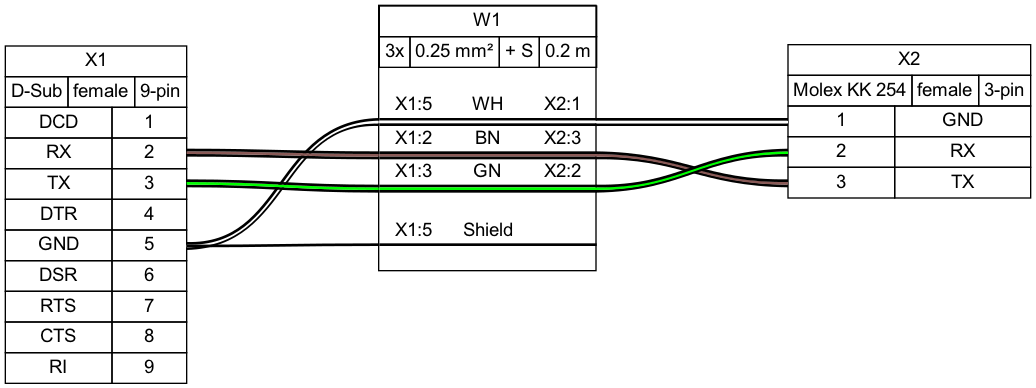
Demo 01
connectors:
  X1:
    type: D-Sub
    subtype: female
    pinlabels: [DCD, RX, TX, DTR, GND, DSR, RTS, CTS, RI]
  X2:
    type: Molex KK 254
    subtype: female
    pinlabels: [GND, RX, TX]

cables:
  W1:
    gauge: 0.25 mm2
    length: 0.2
    color_code: DIN
    wirecount: 3
    shield: true

connections:
  -
    - X1: [5,2,3]
    - W1: [1,2,3]
    - X2: [1,3,2]
  -
    - X1: 5
    - W1: s
Output file:
Bill of Materials (auto-generated)
Demo 02
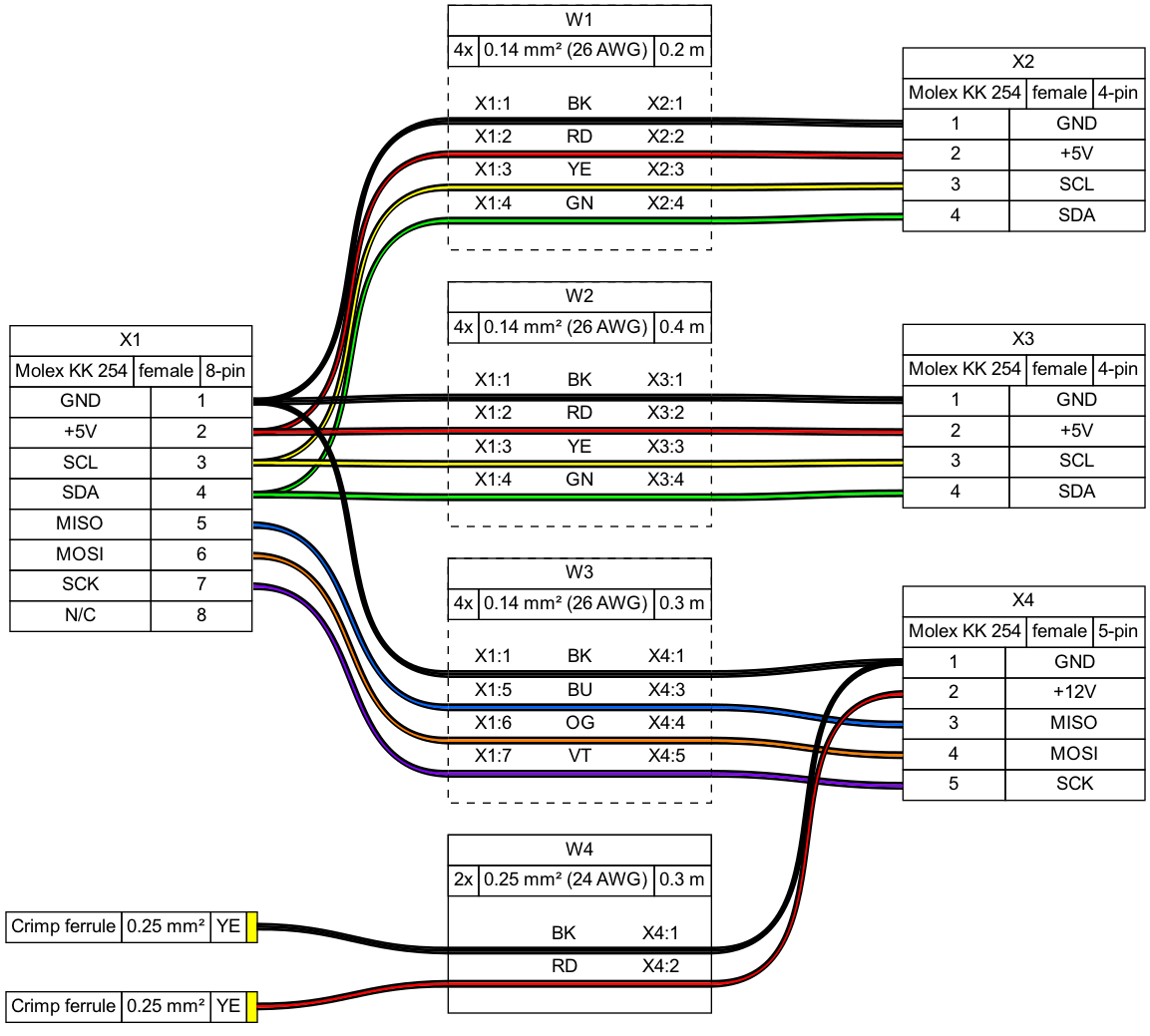
Tutorial and example gallery
See the tutorial page for sample code, as well as the example gallery to see more of what WireViz can do.
Usage
Installation
Requirements
WireViz requires Python 3.7 or later.
WireWiz requires GraphViz to be installed in order to work. See the GraphViz download page for OS-specific instructions.
Note: Ubuntu 18.04 LTS users in particular may need to separately install Python 3.7 or above, as that comes with Python 3.6 as the included system Python install.
Installing the latest release
The latest WireViz release can be downloaded from PyPI with the following command:
pip3 install wireviz
Installing the development version
Access to the current state of the development branch can be gained by cloning the repo and installing manually:
git clone <repo url>
cd <working copy>
git checkout dev
pip3 install -e .
If you would like to contribute to this project, make sure you read the contribution guidelines!
How to run
$ wireviz ~/path/to/file/mywire.yml
This will output the following files
mywire.gv         GraphViz output
mywire.svg        Wiring diagram as vector image
mywire.png        Wiring diagram as raster image
mywire.bom.tsv    BOM (bill of materials) as tab-separated text file
mywire.html       HTML page with wiring diagram and BOM embedded
Command line options
--prepend-file <FILE>to prepend an additional YAML file. Useful for part libraries and templates shared among multiple cables/harnesses.-o <OUTPUT>or--output_file <OUTPUT>to generate output files with a name different from the input file.-Vor--versionto display the WireViz version.-hor--helpto see a summary of the usage help text.
Syntax description
A description of the WireViz YAML input syntax can be found here.
(Re-)Building the example projects
Please see the documentation of the build_examples.py script for info on building the demos, examples and tutorial.
Changelog
See CHANGELOG.md
Status
This is very much a work in progress. Source code, API, syntax and functionality may change wildly at any time.